
Samsung Refrigerator Problems: 6 Common Faults, 5 Frost Checks and 4 Reset Steps
What Are the Common Problems With a Samsung Refrigerator?
Six faults are the ones to check first on a Samsung refrigerator.
- Frost builds up in the freezer
- The refrigerator or the freezer is too warm
- The ice maker stops making ice
- Water leaks inside or under the refrigerator
- The refrigerator runs constantly or makes an unusual noise
- The display shows a code, or the controls do not respond
These are symptoms and not brand faults, and the model number decides the parts, the codes and the wait times. The manufacturer document for the model sets them, and this page gives no codes, key sequences or wait times from memory.
Is a Samsung refrigerator more likely to fail than another brand?
This page makes no brand comparison, because the model, the age, the use and the care decide which faults appear. Identify the model before you search for a fix.
Where Is the Model Number on a Samsung Refrigerator?
The model and serial number label usually sits inside the refrigerator compartment, and the manual shows the exact position. The model number decides which manual, which parts and which codes apply, so record it first. Do not use a manual, a code list or a part for another model.
What if the label is worn or hidden?
Check the manual or the purchase record, which list the model, and ask a technician to read the label. Photograph the label once you find it.
Why Does Frost Build Up in a Samsung Refrigerator?
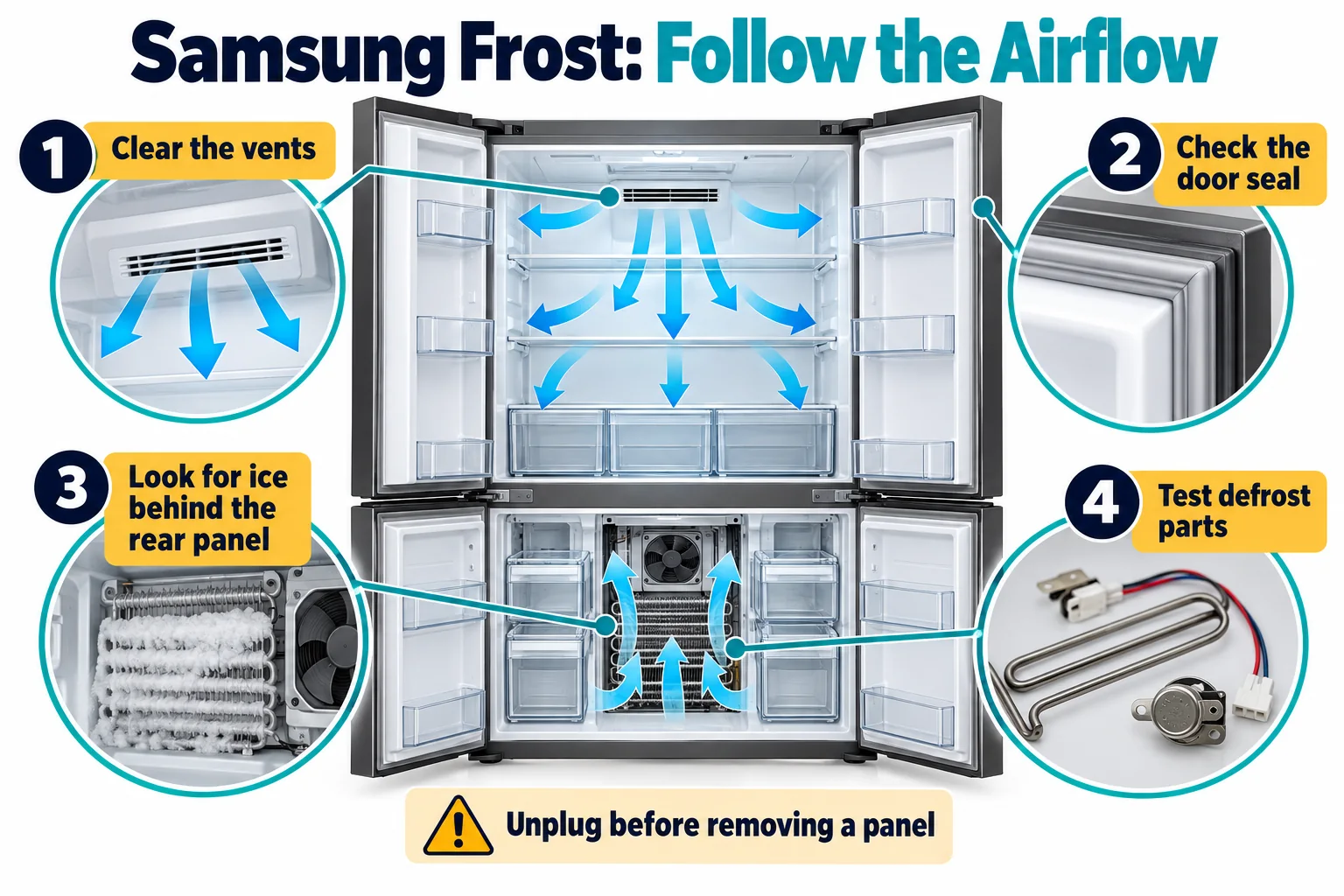
Frost builds up when warm, moist air enters the freezer or when the defrost system fails, so narrow the cause in order.
Safety notice: Unplug the refrigerator before touching any part behind a panel. Do not use a pick, a knife or a screwdriver to chip ice, and do not use a heat gun or an open flame near the evaporator coil. Electrical testing, refrigerant handling and sealed-system work belong to a technician.
Five checks come in order:
- Look at where the frost builds, and photograph it.
- Check that the door closes fully and that the seal grips all the way around.
- Check that no food blocks the vents and that the freezer is not overfilled.
- Look for water or ice on the freezer floor, and note it.
- Clear the frost as the manual states, and note how soon it returns.
The causes of frost and the defrost parts are in refrigerator frost and defrost problems. Difficulty: easy for the checks, and technician-assisted when a defrost part must be tested or replaced.
Does frost mean the defrost system has failed?
Not always, because a door that leaks air or a blocked vent can build frost, so check them first. If the checks find no leak and no blockage, the defrost parts are in refrigerator frost and defrost problems.
What Else Looks Like a Samsung Refrigerator Fault?
A loose plug, a tripped breaker, a changed setting, a warm load or a door that does not close can all mimic a fault. Check these before a reset, because they cost nothing to fix. A hot room and a recent power cut also lengthen the running time. A refrigerator that stays faulty after the checks needs a reset or a closer look.
Should you reset a refrigerator every time a fault appears?
No. A reset suits a temporary electronic fault, and a fault that keeps returning needs a diagnosis and not another reset. Record how often the fault returns, and give the record to the technician.
How Do You Reset a Samsung Refrigerator?
Reset a Samsung refrigerator by cutting the power for the wait time that the Samsung document states, then restoring it.
Safety notice: Unplug the refrigerator by the plug body, and do not use a damaged or wet outlet or cord. Do not bypass a safety device. Electrical testing, refrigerant handling and sealed-system work belong to a technician.
Four steps reset the refrigerator:
- Photograph any code on the display, and note the symptoms.
- Unplug the refrigerator by the plug body, and keep the doors closed.
- Wait for the time that the Samsung document for the exact model states; do not use a universal wait time or reset sequence.
- Plug the refrigerator in, set the temperature as the manual states and watch the display and the cooling over the following hours.
Difficulty: easy.
Does a reset fix every Samsung fault?
No. A reset clears a temporary electronic fault, and it does not repair a failed part or a fault in the sealed system. A fault that returns after a reset needs a diagnosis.
What Do Samsung Error Codes Mean?
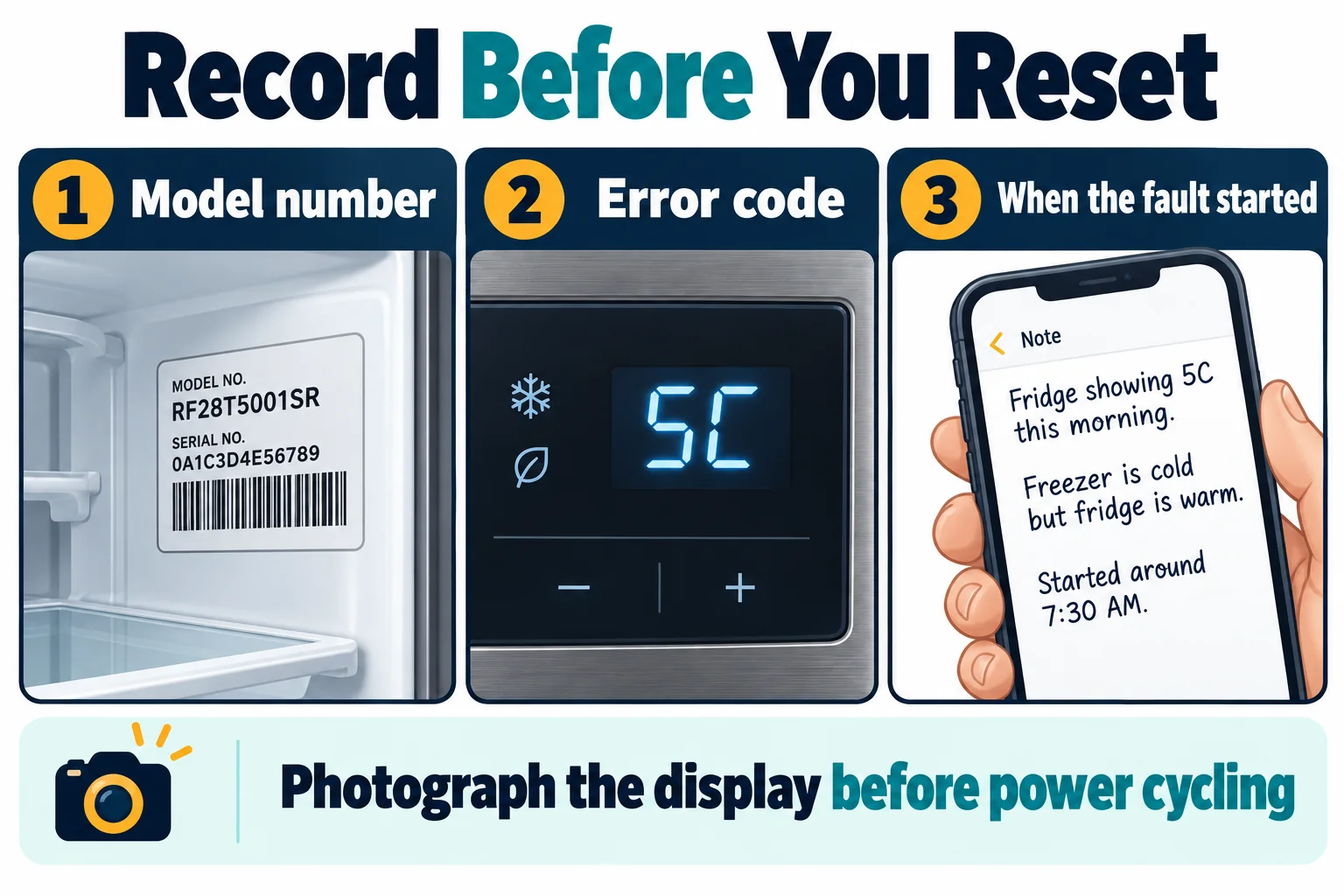
The Samsung document for the model lists each code and its meaning, so match the code on the display to that document. Note the code exactly as the display shows it, and photograph it. A code is a clue and not a verdict, because a sensor, a wire or a board can cause it. The code list and the common meanings for Samsung are in Samsung refrigerator error codes.
What if the display shows no code?
A blank display points to a power fault or a failed board, so check the outlet and the breaker first. A dark display with a running compressor points to the display and not to the cooling.
What Should You Record Before You Call for Help?
Record the model number, the code, the symptoms and what you checked, because that information speeds the diagnosis. Photograph the display, the label and the frost. Note when the fault started and whether it follows a power cut, a move or a change of setting. Keep the purchase record, because warranty terms differ and a claim needs the model number and the proof of purchase. Ask the warranty provider to confirm the cover in writing, and read the terms for the part and the labor before you book.
When Should You Call a Technician?
Call a technician when frost returns after you clear it, a code returns after a reset or you see damage or burn marks. A refrigerator that will not cool, a compressor that is loud, hot or clicking, an oily residue, water near the wiring and any sealed-system fault need a technician. Stop and unplug the refrigerator if you smell burning. Give the technician the model number, the symptoms, what you checked and the code, whose meaning is in Samsung refrigerator error codes. Under warranty, call the manufacturer first, because the warranty terms decide who may repair it. Otherwise, ask for a written quote that names the fault.
What Do People Also Ask About Samsung Refrigerators?
Why does frost build up in my Samsung refrigerator?
Warm, moist air from a leaking door or a blocked vent, or a defrost fault, builds frost, as explained in refrigerator frost and defrost problems.
How do I reset my Samsung refrigerator?
Cut the power for the wait time that the Samsung document for the model states, then restore it and watch the display.
What do Samsung refrigerator error codes mean?
The Samsung document for the model lists each code and its meaning, and the common meanings are in Samsung refrigerator error codes.
Why is my Samsung refrigerator not cooling?
Dirty coils, a worn door seal, a stopped fan or a sealed-system fault can stop the cooling, and a technician must test the sealed system.
Where is the model number on a Samsung refrigerator?
The label usually sits inside the refrigerator compartment, and the manual shows the exact position.
Official Samsung refrigerator references
Samsung codes and reset steps vary by model and market. Record the full code before removing power, then use the exact model support page.

Hi, I’m Ryan, a refrigeration engineer based in the UK Midlands. I’m passionate about engineering, technology, and understanding how things work, especially when it comes to heating, ventilation, air conditioning, and refrigeration systems.
I enjoy the hands-on side of engineering, from working with technical equipment to exploring practical solutions to everyday challenges. For me, engineering is more than just a profession; it’s about problem-solving, continuous learning, and developing valuable technical skills.
I also enjoy sharing glimpses of the engineering world through my Instagram page, @hvac.razza, where I showcase tools, equipment, and aspects of HVAC work.
Outside the technical side of things, I value genuine connections, meaningful conversations, and opportunities to learn from others. I’m always interested in connecting with people who share an appreciation for technology, practical skills, and personal growth.